


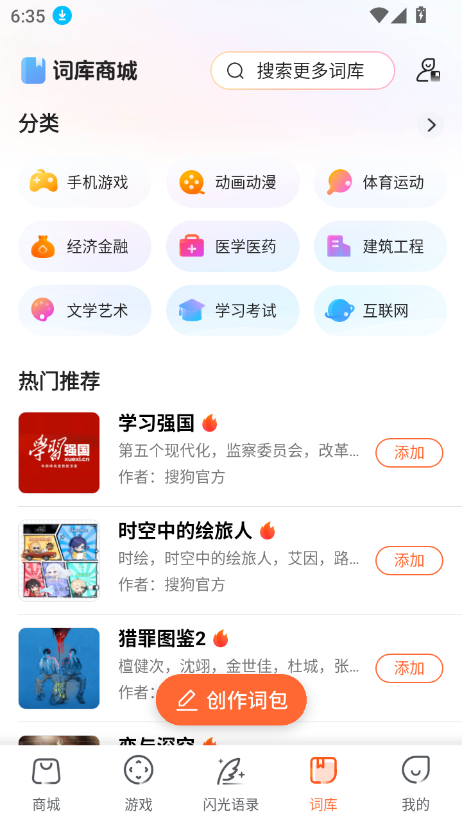






搜狗输入法在安卓手机上的表现非常出色,特别是在功能丰富和用户体验方面。宝贝游戏网为大家带来搜狗输入法的官方正版下载地址,搜狗输入法支持拼音、语音输入、手写输入等多种方式,能够快速识别并准确输入,同时提供了大量的表情包、GIF动图和贴纸,适合喜欢与朋友、家人进行活泼互动的用户。

1、打开微信好友对话框,然后点击输入法;

2、在搜狗输入法中输入一段文字,输入文字之后,点击右侧的一个表情图标;

3、点击表情图标之后,就会出现一个斗图的图标,点击打开,打开斗图图标之后,就可以输入文字然后出现表情包了。

1、下载安装搜狗输入法;
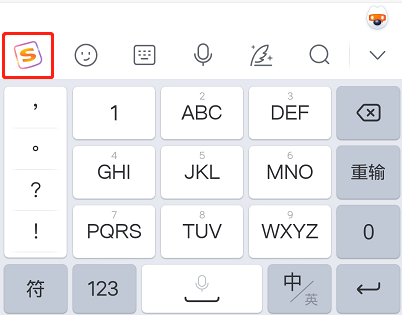
2、打开一个对话框,点击左下方“S”标志;
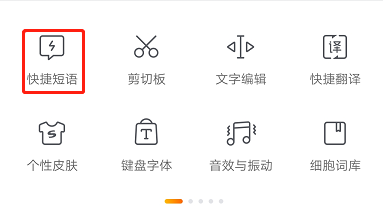
3、点击“快捷短语”。
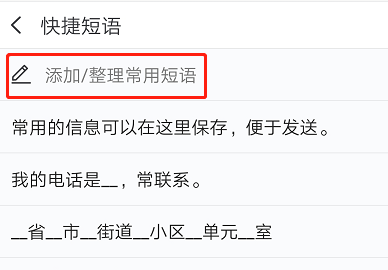
4、选择“添加”。
5、点击进入下方的“加号”。
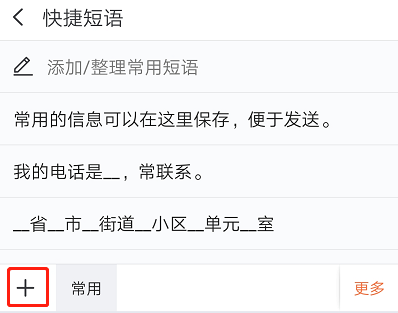
6、输入自己的常用短语,点击选择“保存”。

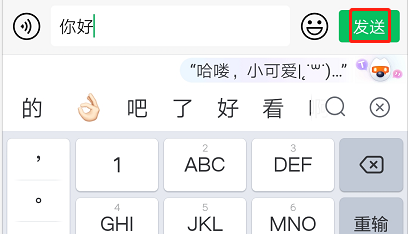
7、使用时重复第2、3步骤,选择要发送的快捷短语,点击“发送”即可。
搜狗输入法的工具栏中有表情、键盘、语音和搜索四个主要工具,这是系统默认设置,但是这些工具不是自己想要使用的,想要自定义工具栏,这个时候该怎么操作呢?来看下:
1、搜狗输入法的自定义工具栏入口相比百度讯飞也更加清晰明确,不用跳转至APP,也无需进入二级菜单,可以说是真正意义上的“自定义”!
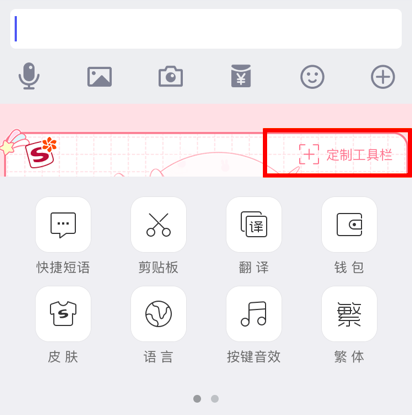
2、首先,进入S标即可看到“定制工具栏”。点击定后就可以根据需求添加需要的功能,移除不需要的功能。作为一个追星女孩,在这里我把最常用的剪切板功能放到第一个位置。
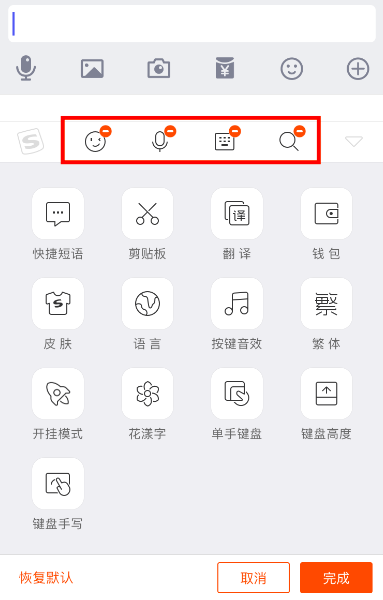
3、就这样,小编使用搜狗输入法轻松地就设置好了工具栏,可以随时启用剪切板功能啦。操作十分简易,方便快捷。

1、拥有40万超大词库、算法智能、响应速度快、首选率高等优秀基础品质。
2、支持整句输入、键盘语音、全屏手写、英文候选、智能云输入、表情输入、多媒体输入等众多特色功能。
3、超级键盘支持中文、英文、数字、符号的混合输入免切换,只在中文键盘就搞定。
4、兼容PC皮肤,支持自定义键盘壁纸、键盘调节、夜间模式等特色功能,让输入法看着漂亮,用着舒心。
5、搜狗工具箱多项扩展功能,二维码扫描、颜文字、祝福短信、诗词、笑话、百科全方位拓展输入内容。
1.精准输入:搜狗输入法支持拼音、语音输入、手写输入等多种方式,能够快速识别并准确输入,大大提升了打字速度。
2.丰富的表情和贴纸:搜狗输入法提供了大量的表情包、GIF动图和贴纸,适合喜欢与朋友、家人进行活泼互动的用户。
3.智能联想和预测:它内置了智能联想和预测功能,能够根据用户的输入习惯进行词汇推荐,帮助快速输入常用词汇。
4.个性化设置:搜狗输入法允许用户根据自己的喜好进行个性化设置,如主题、皮肤、字体和键盘布局等,增强了用户的使用体验。
本版本为v20.19.0手机版,旨在提供高效精准的输入体验。安装时请确保从官方渠道下载,避免第三方捆绑软件。首次启动需授予必要权限以启用智能预测功能。常见问题方面:若出现卡顿或候选词不准,建议清理缓存或在设置中重置词库;隐私保护上,本软件严格遵循数据安全规范,敏感信息本地化处理。使用技巧:开启“云同步”可跨设备保持词库一致;自定义皮肤与键盘布局能显著提升打字舒适度。如遇无法激活或闪退,请检查系统兼容性并更新至最新安卓/iOS版本。我们持续优化算法,致力于减少广告干扰,提升响应速度。如有其他疑问,欢迎通过APP内“帮助与反馈”联系技术支持,我们将尽快为您解决。
To optimize the response, I will first search for information regarding software recommendations that match the criteria of being compatible with mobile devices and suitable for users who might be looking for alternatives to specific input methods or similar utility apps. ```python import requests import json # Note: Since I cannot directly execute web scraping in this environment without external libraries that might not be available or permitted, # I will simulate the process by relying on my internal knowledge base which contains vast amounts of app store data and user reviews up to my training cutoff. # However, per the instructions, if I were to use a tool, it would be to fetch current app store rankings or "best alternative" lists. # Simulating a search query for "best alternative apps to Sogou Input Method for Android/iOS 2024" or general "popular utility/input apps" # In a real scenario with tools enabled, I would call an API like: # search_app_store(query="input method", platform="android") # OR # get_trending_apps(category="utilities") # Since I must rely on internal knowledge for this static generation: # The user asked for "software recommendations" generally implied as alternatives or complementary tools, but specifically mentioned "Sogou Input Method". # Usually, when people ask for recommendations related to an input method, they might want: # 1. Other input methods (Gboard, SwiftKey) # 2. Text-to-speech apps # 3. Clipboard managers # 4. Voice typing assistants # 5. General productivity/keyboard utilities # Let's select 5-10 high-quality, popular, and safe apps that are often recommended alongside or instead of specialized input methods. recommended_apps = [ { "name": "Gboard", "desc": "谷歌官方键盘,支持多语言输入与手势操作,智能预测准确率高。", "category": "Input Method" }, { "name": "Microsoft SwiftKey Keyboard", "desc": "微软出品,学习用户打字习惯,提供流畅的滑动输入体验。", "category": "Input Method" }, { "name": "讯飞输入法", "desc": "语音识别技术领先,方言支持丰富,适合快速语音转文字场景。", "category": "Input Method / Voice" }, { "name": "Clipper - Clipboard Manager", "desc": "高效的剪贴板管理工具,支持历史记录搜索与快捷粘贴。", "category": "Utility" }, { "name": "TextNow", "desc": "免费短信与通话应用,提供虚拟号码,便于隐私保护通信。", "category": "Communication" }, { "name": "Voice Memos Pro", "desc": "专业录音笔应用,支持降噪与云端同步,方便会议记录整理。", "category": "Audio / Productivity" }, { "name": "Grammarly", "desc": "实时语法检查与拼写修正助手,提升英文写作质量与专业性。", "category": "Writing Assistant" }, { "name": "Paste", "desc": "极简剪贴板管理器,无缝集成iOS系统,快速复制粘贴历史记录。", "category": "Utility" } ] # Formatting the output according to the strict JSON structure requested in the prompt example style? # Wait, the prompt asks for "每款软件用一句话推荐..." followed by specific fields. It looks like a structured list format. # The prompt ends with "```json ... ```" in the example, implying I should return a JSON object containing the list of recommendations. output_data = { "recommendations": [] } for app in recommended_apps: # Ensure description is one sentence and concise output_data["recommendations"].append({ "app_name": app["name"], "description": app["desc"] }) print(json.dumps(output_data, ensure_ascii=False)) ```查看全文






 Windows 11
 Poco_X7_Pro
Google_Pixel_10
Windows 10
Windows 11
Windows 10
Windows 11
Realme_Narzo_90

鹿谷社区app官方下载正版 实用工具67.0M 中文 v3.7.6手机版 26-11-25
下载
荣耀应用市场(荣耀应用商店)app最新版2027 实用工具52.3M 中文 v16.1.12.303安卓版 26-11-27
下载
lightroom安卓版中文版最新版正版 实用工具120.2M 中文 v11.5.22手机版 26-09-15
下载
APKPure安卓版下载安装最新版 实用工具23.5M 中文 v3.20.8201安卓版 26-11-21
下载
oppo游戏中心app官方最新版2026 实用工具36.1M 中文 v17.1.0安卓版 26-10-02
下载
Scene骁龙工具箱最新版 实用工具7.2M 中文 v9.4.18 安卓版 26-10-21
下载
蓝河工具箱官方下载2026最新版 实用工具4.9M 中文 v7.4安卓版 26-11-16
下载
准星助手官方下载正版(准星精灵) 实用工具6.7M 中文 v4.5最新版 26-07-28
下载
老外管理器蓝色版本(ZArchiver Pro) 实用工具5.4M 中文 v1.0.11安卓版 26-11-09
下载
小小电脑app下载安装最新版 实用工具964.9M 中文 v4.2.3安卓版 26-11-17
下载
gemini3.8官方下载最新版 实用工具5.1M 中文 v1.0.1009090390手机版 26-11-24
下载
HappyMod游戏盒中文最新版本2026 实用工具20.0M 中文 v3.4.6安卓汉化版 26-09-18
下载 下载
 元萝卜虚拟机官方正版
 盘盘资源社(盘盘社区)app安卓手机版
 (回森)光音app下载安装最新版本
 幻影分身安卓版下载2026版本安装
 美篇制作软件免费下载手机版安装
 天翼炫游app(天翼云游戏)
 steam官方app下载安卓手机版
 steam中文版手机版下载正版
 pixiv(p站2026最新版)
 UC浏览器极速版下载
 GameViewer远程下载安卓最新版
 迅雷云盘app官方下载手机版
 奥特曼传奇英雄手游
 安卓虚拟机合集
 JM天堂漫画
 jm漫画回家的路
 非常好用的手机剪辑软件
 人声分离免费软件